How to organise ChatGPT chats into folders
Updated 27 October 2026
After a few months, ChatGPT's sidebar is a long scroll of half-remembered titles. ChatGPT doesn't have folders, but it has three tools that do most of the job: projects, pins and archive. Here's how to use them, and what to do if you want real nested folders and tags.
The short answer
- Projects are ChatGPT's folders: group a piece of ongoing work with its files and instructions.
- Pin the handful of chats you open every week; archive the ones you're done with.
- For nested folders, tags, and one system across ChatGPT, Claude and Gemini, add an organiser like TidyTalk.
1. Projects: ChatGPT's version of folders
A project is a workspace that holds chats, files and instructions together. Every chat started inside it gets the same background, so you stop re-explaining your job, your codebase or your client in each new chat. Projects have been available on the free plan since September 2025.
Create a project and move chats into it
- In the left sidebar, open Projects and choose New project. Give it a clear name.
- Optionally add files (briefs, specs, notes) and instructions ("Answer as a senior Python reviewer; our stack is Django and Postgres").
- To file an existing chat, drag it from the sidebar onto the project, or use the chat's ⋯ menu and move it there.
When creating a project you may be offered project-only memory: chats in the project can draw on each other but not on chats outside it. Useful for client work you want kept separate.
What projects are good at, and where they stop
- Good: one ongoing piece of work with documents attached: a thesis, a product launch, a codebase, a client.
- File limits: reported limits are about 5 files per project on Free, 25 on Plus and 40 on Pro, so they're not a document archive.
- One level only: no projects inside projects, so "Clients → Acme → Website" isn't possible.
- One place per chat: a chat lives in one project. There are no tags to mark it as, say, both "Acme" and "invoices".
- ChatGPT only: your Claude and Gemini chats about the same work live elsewhere.
2. Pin the chats you use every week
Open a chat's ⋯ menu in the sidebar and choose Pin chat. Pinned chats sit in a Pinned section at the top of the sidebar, alongside pinned GPTs and projects. If your pinned chats seem to vanish, check whether that section is collapsed; a mid-2026 sidebar update caught a lot of people out.
Keep pins few. Five pinned chats are a shortcut; twenty are just a second sidebar.
3. Archive instead of delete
Archiving takes a chat out of the sidebar without losing it. Archived chats still appear in ChatGPT's search, and you can see them all under Settings. Deleting is permanent: deleted chats leave search and can't be recovered. A good rule: archive anything finished that you might need again, delete only what you're sure about.
4. Rename chats as you go
ChatGPT names chats after your first message, which rarely describes what the chat became. Renaming takes two seconds (⋯ → Rename) and makes both the sidebar and search far more useful. A naming habit that works: topic, then status, such as "Pricing page copy, final" or "Postgres slow query, solved".
5. Real folders and tags, across ChatGPT, Claude and Gemini
If you want nested folders, tags and a single system for every AI app you use, TidyTalk adds them without changing anything in ChatGPT:
- Install TidyTalk (free) and open chatgpt.com while signed in. It reads your chat list in a few seconds.
- Click the TidyTalk icon to open the side panel, go to Chats and click New folder. Add subfolders as deep as you like.
- Drag chats onto folders, or use a chat's ⋯ menu to move, tag or pin it. Claude and Gemini chats sit in the same folders.
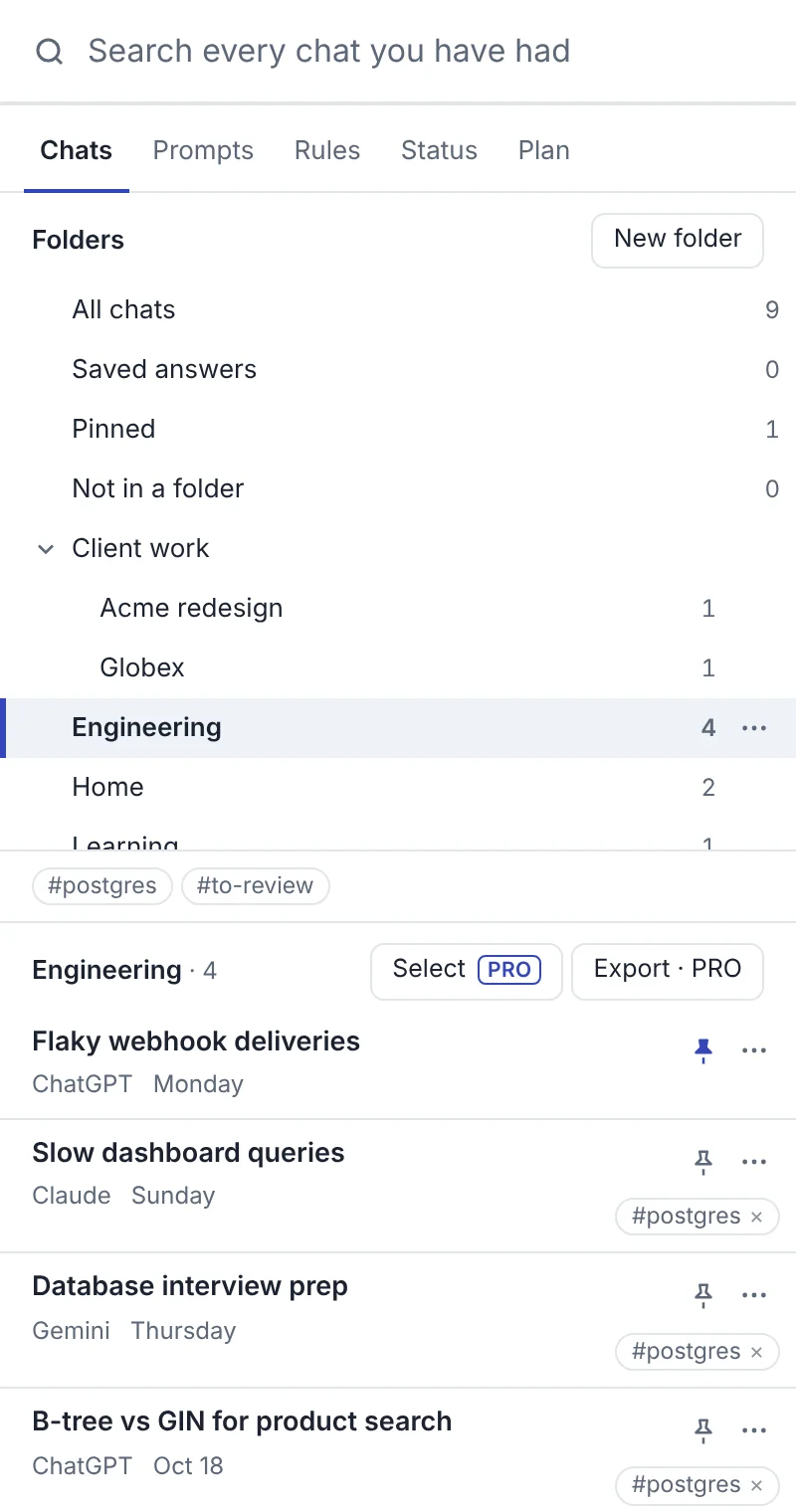
- Tags let one chat belong to several topics at once.
- Rules (Pro) file new chats automatically: "chats mentioning invoice go to Finance".
- Bulk actions (Pro): select many chats and move, tag, pin or export them together.
- Search every message in every folder, and open the chat at the exact spot.
TidyTalk keeps its folders in your browser and never moves or renames anything in ChatGPT, so you can keep using projects alongside it. The free plan includes 5 folders and 3 tags; Pro has no limits.
A folder structure that lasts
Most systems fail because they're too detailed. Start with areas you actually return to, not every topic you've ever asked about:
| Folder | Subfolders | What goes in |
|---|---|---|
| Work | One per client or product | Specs, drafts, emails, analysis |
| Code | One per repository | Debugging, reviews, snippets worth keeping |
| Learning | One per course or skill | Explanations, practice questions |
| Home | Travel, Money, Health, Recipes | Plans and answers you'll reuse |
| Prompts that work | None | Chats whose setup you want to copy |
Then: pin only what you use weekly, archive what's finished, and spend two minutes on Friday filing anything unfiled. Most chats never need a folder at all; search finds them.
Questions
Does ChatGPT have folders?
No. Projects are the closest thing: they group chats, files and instructions. They're one level deep, and each chat can be in only one project.
Are ChatGPT projects free?
Yes. Projects have been available to free accounts since September 2025, with lower file limits than paid plans.
Can I put a project inside another project?
No. ChatGPT projects don't nest. For subfolders, use an organiser extension that keeps its own folder tree.
What's the difference between archiving and deleting a chat?
Archived chats leave the sidebar but stay searchable and can be restored. Deleted chats are removed from search and can't be recovered.
Will an organiser extension change my ChatGPT sidebar?
TidyTalk doesn't: its folders, tags and pins live in its own side panel and in your browser. Your ChatGPT projects, pins and chat names stay as they are.
Sources
- OpenAI Academy: Projects in ChatGPT
- Tech.co: ChatGPT Projects available for free (September 2025)
- Popular AI: ChatGPT's Pinned section after the sidebar update (June 2026)
- OpenAI Help: Searching chat history (archived and deleted chats)
TidyTalk is an independent Chrome extension and isn't affiliated with OpenAI, Anthropic or Google. Add it to Chrome, free.