How to save a ChatGPT conversation as a PDF
Updated 27 October 2026
You want to send a ChatGPT conversation to a colleague, attach it to a report, or keep it somewhere that isn't ChatGPT. There's no "Download as PDF" button for chats, but there are four reliable ways to get one, each with a catch worth knowing.
The short answer
- Quickest: press Ctrl+P (Cmd+P) on the chat and choose Save as PDF. Check the preview.
- To share, not file: use ChatGPT's share link.
- Everything, as a backup: the data export (HTML, not PDF).
- Clean PDF or Markdown of any chat, in one click: an exporter such as TidyTalk.
1. Print the chat to PDF from your browser
- Open the conversation on chatgpt.com and scroll to the very top, then back down, so the whole chat is loaded.
- Press Ctrl+P (Cmd+P on a Mac).
- Set the destination to Save as PDF. Under More settings, turn on Background graphics if code blocks look blank.
- Scroll through the preview before saving.
It's free and instant, but check the preview: long chats can come out with missing messages, tables or code cut off at the page edge, and the sidebar or buttons printed in. It works well for short chats and poorly for long technical ones.
2. Share a link instead of a file
Use the Share button at the top of a chat to create a link. Anyone with the link can read the conversation as it was when you shared it. It's the easiest way to show a chat to someone, but it's not a file: it needs the internet, it can be revoked, and you shouldn't share anything private this way. Manage or delete shared links in Settings → Data controls.
3. Export your whole ChatGPT history
- Open Settings → Data controls → Export data and confirm the export.
- OpenAI says the export can take up to seven days. You get an email with a download link that expires 24 hours after it arrives.
- Unzip it.
chat.htmlhas every conversation in one page;conversations.jsonhas the same data for scripts.
You can open chat.html and print it to PDF, but with a long history that's one enormous document. The export is best as a backup. On Business and Enterprise workspaces, members can't export themselves; ask the workspace owner. If you can't sign in, OpenAI's privacy portal (privacy.openai.com) can send your data instead.
4. Export one chat as a clean PDF, Markdown, text or JSON
TidyTalk, our Chrome extension, adds a proper per-chat export for ChatGPT, Claude and Gemini:
- Install TidyTalk (free) and open chatgpt.com while signed in.
- Click the TidyTalk icon to open the side panel and find the chat by searching or browsing.
- Open the chat's ⋯ menu, choose Export as → PDF (print), and pick Save as PDF in the print dialog.
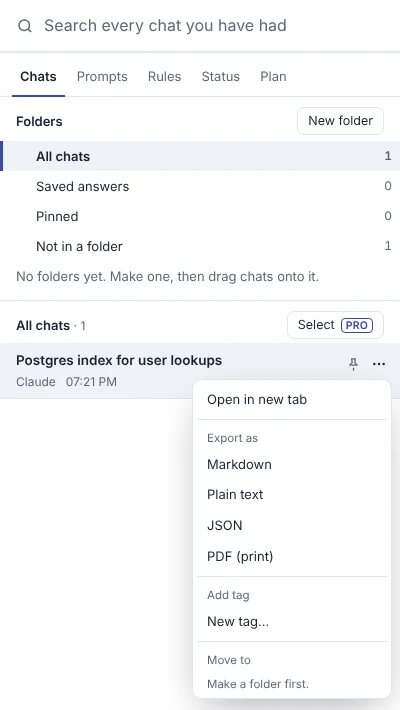
The PDF is laid out for paper: the whole conversation, clear labels for your messages and ChatGPT's, code blocks that wrap instead of being cut off, and none of ChatGPT's buttons. Exporting one chat at a time is free; with Pro you can export a whole folder, a selection or your search results in one go.
One thing to know: ChatGPT limits how fast chats can be read, so a chat older than 30 days that you haven't opened recently may need opening once in ChatGPT before its full text is available to export.
Which format should you choose?
| You want to… | Use |
|---|---|
| Email or attach the conversation | |
| Keep it in Notion, Obsidian or a Git repo | Markdown (headings and code kept) |
| Paste it into something basic | Plain text |
| Process it with a script | JSON, or the data export's conversations.json |
| Show it to someone quickly | ChatGPT's share link |
| Back up everything | ChatGPT's data export, every few months |
Tips for a better PDF
- Rename the chat first. Exports use the chat title, and "Help with this" is a poor file name.
- Trim before you print. If only the last answer matters, copy that response (the copy button under it) into a document instead.
- Check for private details (names, keys, numbers) before sending a PDF or link to anyone.
- Keep the source. A PDF is a snapshot; save the Markdown too if you'll want to edit or search it later.
Questions
Can ChatGPT export a chat to PDF by itself?
There's no built-in "download this chat as PDF" button. Use the browser's print to PDF, the data export, or an exporter extension.
Why is my printed ChatGPT PDF missing messages?
Long chats load as you scroll, and the browser prints what's loaded and how the page is laid out. Scroll through the whole chat before printing, or use an exporter that builds a print page from the full conversation.
How long does the ChatGPT data export take?
OpenAI says up to seven days, though it's often much quicker. The download link in the email expires after 24 hours.
Can I export ChatGPT chats on my phone?
You can request the full data export from the iPhone or Android app (Settings → Data controls → Export data). For single chats, share a link or copy responses.
Can I export Claude and Gemini chats the same way?
Each app has its own options; see how to export Claude chats. TidyTalk exports ChatGPT, Claude and Gemini chats with the same menu and formats.
Sources
TidyTalk is an independent Chrome extension and isn't affiliated with OpenAI, Anthropic or Google. Add it to Chrome, free.