How to save the best AI answers so you can find them again
Updated 27 October 2026
The answer that finally fixed your bug, the email wording that worked, the regex you'll need again in six months. They're all buried in long chats with forgettable titles. Saving the chat isn't enough; you want to save the answer. Here's how, in ChatGPT, Claude and Gemini.
The short answer
- One-off: copy the answer (the copy button under it) into your notes, with a link back to the chat.
- Whole chat: bookmark the chat's address in your browser, in a folder.
- Many answers, searchable, with notes: use a Save button like TidyTalk's on all three sites.
Why saving the chat isn't enough
Most useful chats are long. The part you want is one reply out of thirty, often after several wrong turns. If you save or pin the whole chat, future-you still has to scroll and reread to find the bit that mattered. Saving the answer itself, ideally with a note on why it was good, turns a chat history into a personal knowledge base.
1. Copy it into your notes, with a link back
Every answer in ChatGPT, Claude and Gemini has a copy button underneath it. A simple habit that works:
- Click copy under the answer.
- Paste it into your notes app (Notion, Obsidian, Apple Notes, Google Docs).
- Add one line on why it's useful and paste the chat's address from the address bar, so you can return to the context.
In Gemini you can also send a whole response to Google Docs from its menu (Export to Docs). The downside of copying is effort: it only happens for answers you decide are important in the moment, and they end up separated from the conversation they came from.
2. Bookmark the chat in your browser
Every chat has its own address (for example chatgpt.com/c/… or claude.ai/chat/…). Bookmark it with Ctrl+D (Cmd+D) into a folder such as "AI: keep", and rename the bookmark to describe the answer. It's free and works across all three apps, but it saves the chat, not the answer, and bookmarks aren't searchable by what the answer said.
3. Use the apps' own tools
- Rename the chat after the answer ("Regex for UK postcodes: works"), so search finds it by name.
- Pin it (ChatGPT and Gemini) if you'll need it every week.
- Move it into a project or notebook with related work, so it's in a shorter list.
- Memory isn't storage. Telling ChatGPT or Claude to "remember this" saves a fact about you, not the full answer, and you can't browse it like a list.
4. A Save button on every AI answer
TidyTalk, our Chrome extension, adds a Save button to answers on ChatGPT, Claude and Gemini:
- Install TidyTalk (free).
- On chatgpt.com, claude.ai or gemini.google.com, point at an AI answer and click Save. To keep just part of it, select the text and click Save selection.
- Open the side panel → Chats → Saved answers to see everything you've kept. Add a note, tags and a colour to each.
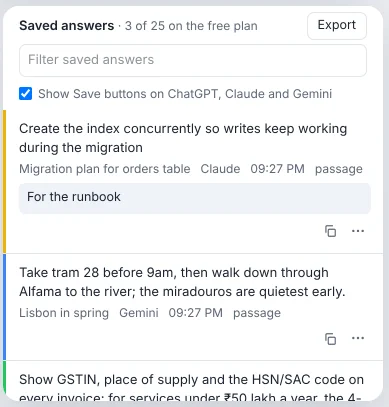
- Saved answers come first in search, so the best version of an answer beats the twenty chats where you asked something similar.
- One click opens the chat at that exact spot, so the context is never lost.
- Export them all as one Markdown file for your notes app.
- Private: saved answers are stored in your browser. With Pro sync they're end-to-end encrypted with your passphrase, or you can leave them out of sync.
The free plan keeps 25 saved answers; Pro keeps unlimited.
What's worth saving
A good test: would I be annoyed to have to ask this again? Things that usually pass:
- Working code, commands and regexes, especially after debugging.
- Wording that worked: emails, cover letters, difficult messages.
- Explanations that finally made something click.
- Decisions and their reasons ("we chose Postgres partial indexes because…").
- Recipes, plans and checklists you'll reuse.
- Prompts that produced great results (or save those as reusable prompts; see how to build a prompt library).
And add a note when you save. "Use this one, the earlier version breaks on empty input" is the kind of thing you won't remember in three months.
Comparing the options
| Method | Saves the answer itself | Searchable later | Links back to the chat | Works in all three apps |
|---|---|---|---|---|
| Copy into notes | Yes | In your notes app | If you paste the link | Yes |
| Browser bookmark | No, the chat | By bookmark name | Yes | Yes |
| Rename and pin | No, the chat | By title | Yes | Each app separately |
| TidyTalk Save | Yes, or a passage | Yes, full text, first in results | Yes, at the exact spot | Yes |
Questions
Can I bookmark a specific message in ChatGPT?
ChatGPT doesn't have message bookmarks. You can pin or rename the whole chat, copy the answer elsewhere, or use an extension that saves individual answers and opens the chat at that message.
Does saving an answer change anything in ChatGPT, Claude or Gemini?
With TidyTalk, no. Saved answers are kept in your browser; nothing is added to or changed in your chats.
What happens to a saved answer if I delete the chat?
The saved text stays in TidyTalk with its note, but the "open at this spot" link will no longer work because the chat is gone.
Can I get my saved answers into Notion or Obsidian?
Yes. Export them from the Saved answers list as a Markdown file, which both apps import directly.
Sources
- Williams College: Saving Gemini chats (Copy response, Export to Docs)
- Claude Help Center: How Claude's memory works
TidyTalk is an independent Chrome extension and isn't affiliated with OpenAI, Anthropic or Google. Add it to Chrome, free.